
Remote ADB using SSH Tunneling
How to access Android devices connected to a remote server from a local machine using ADB and SSH Tunneling
January 27, 2026
Remote ADB using SSH Tunneling
There are times when you need to debug or control an Android device connected to a Remote Server from your local development environment.
In this case, you can use SSH Tunneling to use adb as if the device were connected to your PC.
In this case, you can use SSH Tunneling to use adb as if the device were connected to your PC.
How it works
ADB (Android Debug Bridge) operates in a client-server architecture and communicates through the
By using the Local Port Forwarding feature of SSH to forward requests coming into your local
localhost:5037 port by default.By using the Local Port Forwarding feature of SSH to forward requests coming into your local
5037 port to the 5037 port of the remote PC, your PC's ADB client communicates with the remote PC's ADB server.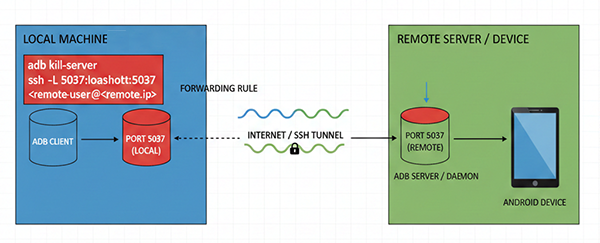
SSH Tunneling
If an ADB server is already running locally, an error occurs because SSH cannot occupy the port as port 5037 is already in use.
Therefore, you must perform tunneling after running kill-server.
Kill local ADB server and SSH Tunneling (in local)shell
If you run
adb in a new terminal while keeping the SSH terminal open, you can access the ADB device on the remote server.New terminal session (in local)shell