
Getting Started with the SmartThings API - Environment Setup
A beginner's guide to setting up your environment for the SmartThings API. This post covers generating tokens and making your first API calls.
January 29, 2026
Getting Started with the SmartThings API - Environment Setup
I needed to control devices using the SmartThings API, so I set up the environment.
Let's call the API to check the list of devices currently registered in my SmartThings.
Let's call the API to check the list of devices currently registered in my SmartThings.
1. Get a Personal Access Token
To use the SmartThings API, you naturally need a Personal Access Token (PAT).
This token acts as an authentication key.
This token acts as an authentication key.
1. Go to the Personal Access Token page and log in with your Samsung Account
Access https://account.smartthings.com/tokens and log in with your Samsung Account.
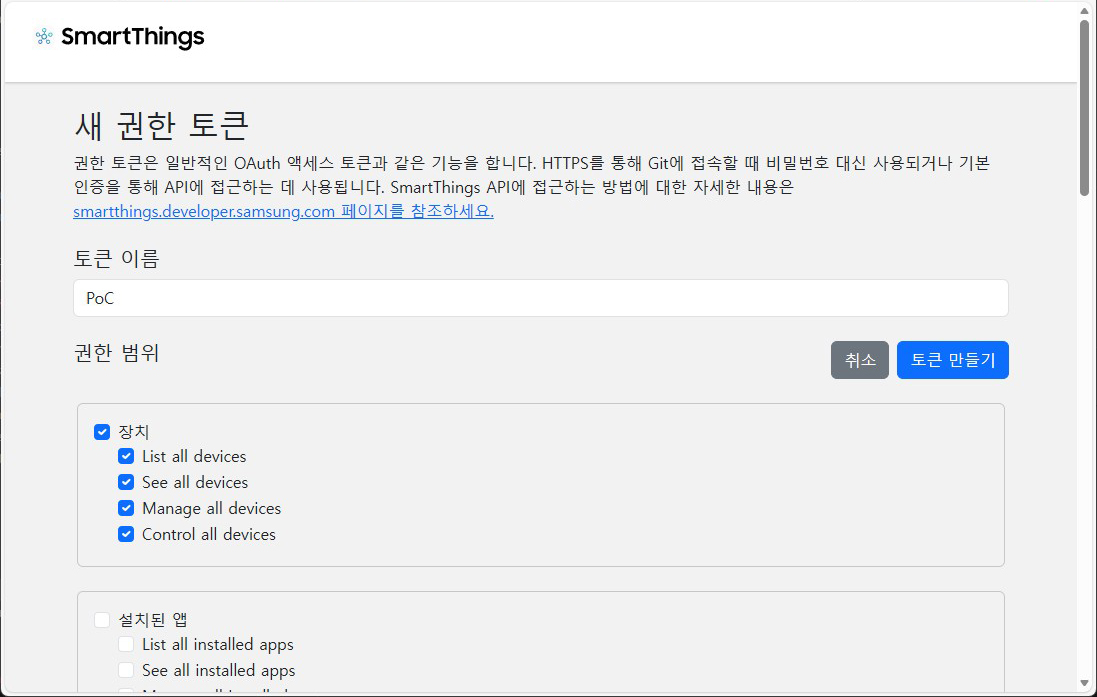
2. Name the token, select scopes, and create
Give it an easily identifiable name and select the scope of permissions for the token.
Security-related permissions should always be granted at the minimum necessary scope.
Since I only need device control, I selected only the permissions for Device.
Security-related permissions should always be granted at the minimum necessary scope.
Since I only need device control, I selected only the permissions for Device.
3. Save the token
Once the token is generated, copy and save it in a safe place. You won't be able to see this token again.
2. Make an API Call
Now you can call the API using the token.
Let's check the device list by making a simple API call with
Use the token you just saved in YOUR_TOKEN.
Let's check the device list by making a simple API call with
curl.Use the token you just saved in YOUR_TOKEN.
List all devices using curlshell
If the request is successful, you will receive a JSON response containing the device list.
Respone from curljson
3. Make an API Call Using Python
I've also written some sample code in Python.
List all devices using pythonpython
4. Next Steps
The environment setup for device control using the SmartThings API is now complete.
I plan to try various things by referring to the SmartThings API documentation whenever I have some free time.
I plan to try various things by referring to the SmartThings API documentation whenever I have some free time.